
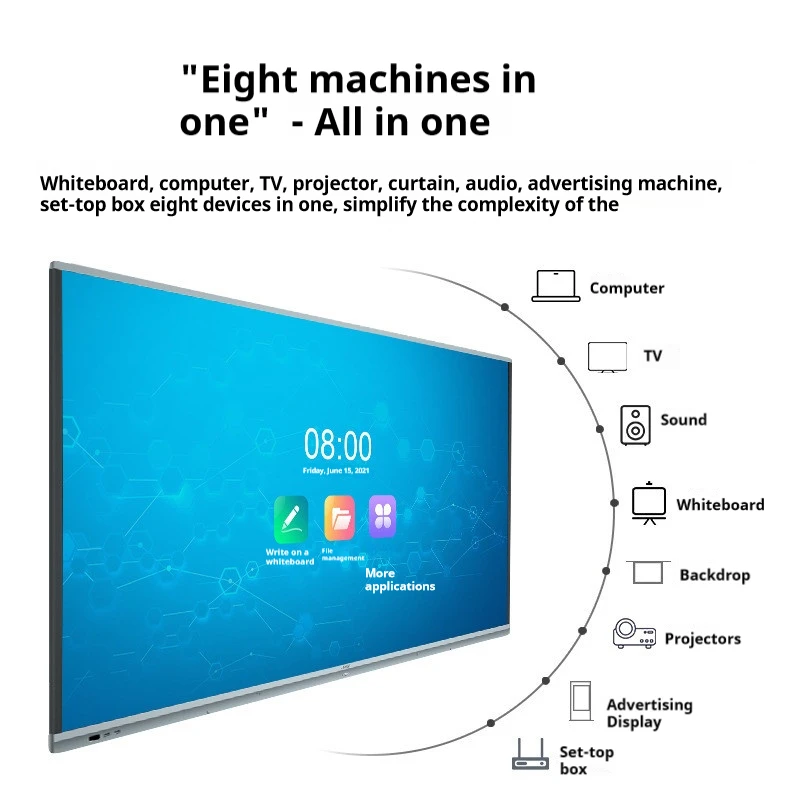
1.What Is a Smart Board?
Smart Boards avansate, touch-sensitive devices that combine the functionality of traditional whiteboards with digital technology. These interactive boards are widely used in both educational and corporate environments due to their ability to enhance presentations, improve collaboration, and engage users in real-time.
How Smart Boards Work
Smart Boards operate through a touch-sensitive surface that detects input from fingers or styluses. They connect to a computer and allow users to control software, write, draw, and interact with content directly on the screen. Integrated with various software platforms, Smart Boards enable seamless sharing and saving of digital notes.
Types of Smart Boards
- Interactive Whiteboards: Utilize projectors to display content on a touch-sensitive surface, ideal for classrooms.
- Touchscreen Smart Boards: Feature built-in displays with high resolution, perfect for professional settings.
- Projection-Based Smart Boards: Combine projectors with interactive surfaces, suitable for large venues.
Benefits of Smart Boards
- Enhanced Learning: Smart Boards integrate multimedia, making lessons more interactive and engaging for students.
- Business Collaboration: In corporate settings, they streamline meetings by allowing real-time collaboration and note-sharing.
- Accessibility: Designed with features that accommodate users with disabilities, ensuring inclusivity.
Future Trends
The future of Smart Boards includes AI integration, improved IoT capabilities, and advancements in display technology, making them even more powerful and versatile.
In summary, Smart Boards are transforming how we learn and work by offering dynamic, interactive experiences that bridge the gap between traditional methods and digital innovation.
2. Canto valer un pizarra interactiva?
When considering investing in a 智能板, understanding the costs involved is crucial. Prices for Smart Boards can vary significantly based on factors such as size, features, brand, and additional accessories. In this guide, we will break down the key elements that influence Smart Board pricing, helping you make an informed decision.
Basic Smart Board Models
The cost of entry-level Smart Boards typically ranges between $1,000 and $2,000. These models are usually smaller in size, around 55 to 65 inches, and come with standard features such as touch interactivity and basic software packages. They are ideal for smaller classrooms or meeting rooms where advanced features are not required.
Mid-Range Smart Boards
For those seeking more advanced functionality, mid-range Smart Boards are available in the $2,000 to $4,000 price range. These boards often feature larger screens (up to 75 inches), multi-touch capabilities, and enhanced software options. They offer better image quality and are well-suited for larger classrooms, corporate settings, and more dynamic presentations.
High-End Smart Boards
High-end Smart Boards, which can cost $5,000 or more, offer premium features and are designed for professional environments where top-tier performance is essential. These models typically include ultra-high-definition displays, advanced multi-touch capabilities, integrated cameras, and robust software suites. Sizes can exceed 80 inches, making them ideal for large conference rooms or auditoriums.
Additional Costs to Consider
Beyond the initial purchase price, several additional costs may arise when investing in a Smart Board:
- Software Licenses: Some Smart Boards require ongoing software subscriptions, which can add several hundred dollars annually.
- Installation: Professional installation services can cost anywhere from $200 to $500, depending on the complexity.
- Maintenance and Support: Extended warranties and technical support packages may also add to the overall cost.
Cost-Effective Alternatives
For those on a tighter budget, refurbished Smart Boards or older models may offer a more affordable option. Additionally, interactive projectors can serve as a cost-effective alternative to Smart Boards, providing similar functionality at a lower price point.
Is a Smart Board Worth the Investment?
智能白板的价值远远超出其价格标签。对于教育机构来说,能够创建互动和引人入胜的课程可以显著提高学习体验。在企业环境中,提高的协作和生产率可以证明这笔投资的合理性。在考虑成本时,权衡这些好处与财务支出是至关重要的。
结论
智能白板的价格可以从 $1,000 到超过 $5,000,具体取决于型号和功能。虽然初始投资可能看起来相当大,但从增强学习、提高协作和增加生产力的长期利益来看,它对于许多教育和商业环境来说都是一个值得考虑的选择。
3.什么是智能白板交互式白板?
一 智能白板交互式白板 是一种尖端技术工具,它结合了传统白板的功能和电脑的力量,为用户提供了一种互动和引人入胜的体验。在教育和企业环境中广泛应用,智能白板正在改变我们教学、学习和协作的方式。
智能白板是如何工作的?
智能白板交互式白板通过一个 touch-sensitive surface 来运行,它可以对来自手指、笔或其他工具的输入做出反应。它通常连接到电脑和投影仪或内置显示屏。电脑的桌面被投影到智能白板的表面,使用户能够控制应用程序、写笔记、绘制图表,并在白板上直接与内容进行交互。
智能白板交互式白板的关键特性
- 触摸交互: 智能白板的核心特性是其触摸敏感表面,它支持单点和多点触控手势。这使得多个用户可以同时与白板进行交互,使其非常适合协作活动。
- 数字墨迹: 用户可以使用笔或手指在白板上书写,数字墨迹可以保存并电子分享。这个特性对于想要捕捉和分发课程笔记的教育者特别有用。
- 集成软件: 智能白板配备了专门设计的软件,旨在增强其功能。这些软件包括创建互动课程、注释演示文稿和访问广泛的多媒体内容的工具。
- 连接选项: 智能白板可以通过HDMI、USB或无线连接连接到各种设备,如电脑、平板电脑和智能手机。这种多功能性允许与现有技术基础设施无缝集成。
使用智能白板交互式白板的益处
- 增强学习体验: 在课堂上,智能白板通过整合多媒体元素(如视频、图像和交互式模拟)使课程更具吸引力。这种方法迎合了不同的学习风格,帮助学生更容易地掌握复杂概念。
- 提高协作: 在企业环境中,智能白板通过允许团队成员共同在文档、演示文稿和头脑风暴会议中工作,促进了实时协作。能够即时保存和共享笔记的功能简化了沟通并提高了生产力。
- Accessibility: 智能白板的设计考虑了无障碍特性,以适应有残疾的用户。这确保了无论身体能力如何,每个人都能从这项技术中受益。
智能白板交互式白板的应用
- 教育: 智能白板在课堂上广泛用于创建互动和动态的学习环境。教师可以开发吸引学生的课程,鼓励学生参与,并促进对材料的深入理解。
- 商业: 在商业世界中,智能白板用于演示、培训会议和协作项目。它们与各种软件平台集成的能力使它们成为改进沟通和决策过程的灵活工具。
结论
一 智能白板交互式白板 1. Ǎ éi gōngnéng hěn qiáng de rúzhuó, báozhìng shùchǎng hé dìzǐ jìshù de zuì jǐn de yǒushì. Bǐng zhì chū tiǎn shǒu héxìng, dìzǐ yīn, hé qiángzhí de ruǎnjiān héchéng, Zhìnéng Bó bǎozhèng xuéxí hé hézuò zài gè zhǒng zhěngyè shàng de píngjià. Jǐnzhì zài shīfànshì huò shì bóhuìshì, Zhìnéng Bó zhùzhì wǒmen huānxié yǔ xìnxī de fāngshì, bǎozhèng tā zài jīntiān de dìzǐ shídài zhōng shì yí gè wújìnlì de zīcái.
2. 4. Zěnme shǐyòng Zhìnéng Bó?
3. Shǐyòng yī 智能板 4. kěnéng bìngbiàn jiāshēng nǐ de jiǎnshì, jiàochéng, hé hézuò huì huì, bǎozhèng tiānchú bóihé de chángxiàn gōngnéng. Jǐnzhì nǐ zài shīfànshì huò gōngsī shèjìng, xuéxí zěnme shǐyòng Zhìnéng Bó yǒuxiào néng zhìzhí nǐ de gōngzuò de huānxié hé yǒuxiào. Zhège zhǐnzhì huì dǎo nǐ zhèngzài gōngzuò shàng de zhèngshì gōngzuò.
5. 1. Shèzhì Zhìnéng Bó
6. Zài nǐ kāishǐ shǐyòng Zhìnéng Bó zhī qián, bǎozhèng suǒyǒu xūyào de bùzuàn dōngchéng huìguānshì kěqìnlièngxié:
- 7. Jiēngé Zhìnéng Bó dào Jìsuànji: 8. Dàbāo zhù Zhìnéng Bó xūyào jiēngé dào jìsuànji. Shǐyòng yǒuxiào de diànlǚ (USB, HDMI, huò wúxiàn) liánjiē Zhìnéng Bó dào nǐ de shìbèi.
- 9. Kǎi shǐ Shǐyòng Jiǎngshìqì huò Bìxiàng: 10. Rúguǒ nǐ de Zhìnéng Bó shǐyòng wàibiàn jiǎngshìqì, kǎi shǐ tā de shǐyòng hé bǎ jìsuànji de píngbiǎo jiǎngxiàng bóihé. Fǒuguǒ yǒu bùnjiàn píngbiǎo de móxíng, dīngyǐng kǎi shǐ bóhé dīngyǐng shí.
- 11. Piānzhēng Bóhé (rú yǒu xūyào): 12. Piānzhēng bǎozhèng shǒu shǒu de tiǎnshǒu rùlù bóhé yǐnxiàng jìnghéng. Fólù píngbiǎo shàng de zhǐnzhì huòxuàn chéngxié piānzhēng guòchéng.
13. 2. Píngzhèng Shǐyòngjiè Mòxiàng
14. Rúguǒ nǐ de Zhìnéng Bó yǐ jīng shèzhì, nǐ kěyǐ kāishǐ huānxié tā:
- 15. Tiǎnshǒu Kòngzhì: 16. Shǐyòng
- 数字墨迹: Select the pen tool to write or draw on the board. Digital ink allows you to annotate presentations, highlight key points, or make notes directly on the displayed content.
- Eraser Tool: To erase mistakes or unwanted marks, use the eraser tool by selecting it from the toolbar or by using the back of the stylus (if equipped).
3. Using Smart Board Software
Most Smart Boards come with integrated software that enhances their functionality:
- Open the Software: Launch the Smart Board software, which may include tools like Smart Notebook, for creating interactive lessons or presentations.
- Create Interactive Content: Use the software to add images, videos, and interactive elements to your presentations. You can save and share these files for later use.
- Save and Share Notes: After a session, save your notes directly to your computer or cloud storage. This allows you to review or distribute the content to others.
4. Incorporating Multimedia
One of the strengths of a Smart Board is its ability to integrate multimedia:
- Play Videos: 直接在板上嵌入或流式传输视频,以增强您的演示。使用触摸界面暂停、播放或导航视频。
- 显示图片和图表: 容易插入图片、图表或图表以支持您的内蓉,使您的演示更具有视觉吸引力。
5. 与他人协作
智能板非常适合协作工作:
- 多点触控交互: 大多数智能板支持多点触控,允许多个用户同时与板交互。此功能特别适用于团队活动和头脑风暴会议。
- 实时编辑: 在实时编辑文档、电子表格或演示文稿,所有更改立即显示在板上。
结论
3. Shǐyòng yī 智能板 有效地不仅仅涉及触摸屏幕——这是关于利用技术来创建交互式、吸引人和高效的演示或课程。通过掌握设置、导航、软件、多媒体集成和协作功能,您可以在任何环境中充分利用智能板的功能。