
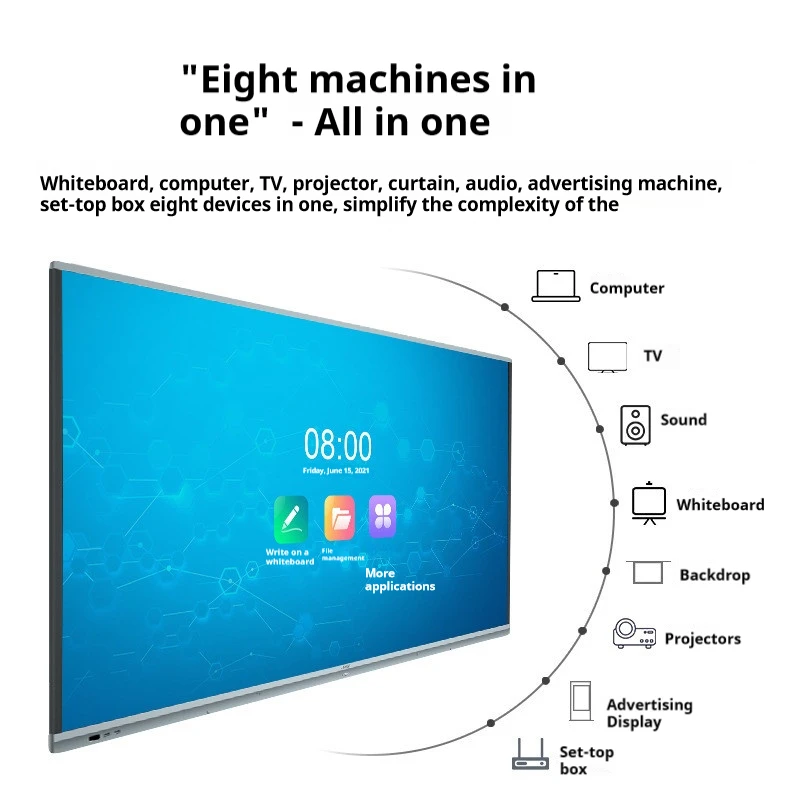
1.What Is a Smart Board?
Smart Boards are advanced, touch-sensitive devices that combine the functionality of traditional whiteboards with digital technology. These interactive boards are widely used in both educational and corporate environments due to their ability to enhance presentations, improve collaboration, and engage users in real-time.
How Smart Boards Work
Smart Boards operate through a touch-sensitive surface that detects input from fingers or styluses. They connect to a computer and allow users to control software, write, draw, and interact with content directly on the screen. Integrated with various software platforms, Smart Boards enable seamless sharing and saving of digital notes.
Types of Smart Boards
- Interactive Whiteboards: Utilize projectors to display content on a touch-sensitive surface, ideal for classrooms.
- Touchscreen Smart Boards: Feature built-in displays with high resolution, perfect for professional settings.
- Projection-Based Smart Boards: Combine projectors with interactive surfaces, suitable for large venues.
Benefits of Smart Boards
- Enhanced Learning: Smart Boards integrate multimedia, making lessons more interactive and engaging for students.
- Business Collaboration: In corporate settings, they streamline meetings by allowing real-time collaboration and note-sharing.
- Accessibility: Designed with features that accommodate users with disabilities, ensuring inclusivity.
Future Trends
The future of Smart Boards includes AI integration, improved IoT capabilities, and advancements in display technology, making them even more powerful and versatile.
In summary, Smart Boards are transforming how we learn and work by offering dynamic, interactive experiences that bridge the gap between traditional methods and digital innovation.
2. 什么价格是一块智能白板?
在考虑投资时 智能板,了解涉及的成本至关重要。智能白板的价格可以根据大小、功能、品牌和附加配件等因素而有很大差异。在本指南中,我们将分析影响智能白板定价的关键因素,帮助您做出明智的决定。
基础智能白板型号
入门级智能白板的价格通常在 $1,000 到 $2,000之间。这些型号通常尺寸较小,约55到65英寸,并配备标准功能,如触摸交互和基本软件包。它们非常适合需要高级功能较小的教室或会议室。
中档智能白板
对于寻求更高级功能的人来说, 中档智能白板 的价格范围在 $2,000 到 $4,000 之间。这些白板通常具有更大的屏幕(高达75英寸),多点触控功能,和增强的软件选项。它们提供更好的图像质量,非常适合较大的教室、企业环境以及更动态的演示。
高端智能白板
高端智能白板,价格可能高达 $5,000,提供高端功能,专为需要顶级性能的专业环境设计。这些型号通常包括超高清显示屏、先进的多点触控功能、集成摄像头和强大的软件套件。尺寸可超过80英寸,非常适合大型会议室或礼堂。
需要考虑的其他费用
除了初始购买价格外,投资智能白板时还可能产生一些额外费用:
- 软件许可证: 一些智能白板需要持续软件订阅,这可能会每年增加数百美元。
- 安装: 专业安装服务的费用可能从 $200 到 $500不等,具体取决于复杂性。
- 维护和支持: 扩展保修和技术支持套餐也可能增加总成本。
经济实惠的替代方案
对于预算有限的人来说,翻新过的智能白板或旧型号可能提供更经济的选择。此外,交互式投影仪可以作为智能白板的低成本替代品,以较低的价格提供类似的功能。
智能白板值得投资吗?
Smart Board的价值远远超出了它的价格标签。对于教育机构来说,能够创建互动和吸引人的课程可以显著提升学习体验。在商业环境中,提高的协作和生产力可以证明投资的合理性。在考虑成本时,重要的是权衡这些利益与财务支出。
12. 结论
Smart Board的成本可以从 $1,000到超过$5,000,取决于型号和功能。虽然初始投资可能看起来很大,但长期来看,在提高学习、改进协作和增加生产力方面的好处使它成为许多教育和商业环境值得考虑的因素。
3.智能板交互式白板是什么?
一 Smart Board交互式白板 是一种尖端技术工具,它结合了传统白板的功能和电脑的强大功能,为用户提供了一个互动和吸引人的体验。在教育和企业环境中广泛应用,Smart Boards正在改变我们教学、学习和协作的方式。
智能板是如何工作的?
智能板交互式白板通过一个 touch-sensitive surface 来操作,它可以对来自手指、笔或其他工具的输入做出响应。它通常连接到电脑和投影仪,或者有内置显示屏。电脑的桌面被投影到Smart Board的表面,使用户能够控制应用程序、写笔记、画图表,并直接在板上与内容互动。
智能板交互式白板的关键特性
- 触摸交互性: Smart Board的核心特性是其触敏表面,它支持单点和多点触控手势。这允许多个用户同时与板进行交互,使其非常适合协作活动。
- 数字墨水: 用户可以使用笔或手指在板上书写,数字墨水可以保存并电子分享。这个特性对于想要捕捉和分发课堂笔记的教育者特别有用。
- 集成软件: Smart Board配备了专门设计的软件,旨在增强其功能。该软件包括创建交互式课程、注释演示文稿和访问广泛的多媒体内容的工具。
- 连接选项: Smart Board可以通过HDMI、USB或无线连接连接到各种设备,如电脑、平板电脑和智能手机。这种多功能性允许与现有技术基础设施无缝集成。
使用智能板交互式白板的益处
- 提升学习体验: 在教室里,Smart Board通过整合多媒体元素,如视频、图像和交互式模拟,使课程更具吸引力。这种方法满足了不同的学习风格,并帮助学生更容易地掌握复杂的概念。
- 改进协作: 在商业环境中,Smart Boards通过允许团队成员共同处理文档、演示文稿和头脑风暴会议来促进实时协作。能够即时保存和分享笔记的能力简化了沟通并提高了生产力。
- Accessibility: Smart Boards设计有便于残障用户使用的无障碍特性。这确保了无论身体能力如何,每个人都能从这项技术中受益。
智能板交互式白板的应用
- 教育: Smart Boards在教室中广泛用于创建互动和动态的学习环境。教师可以开发吸引学生的课程,鼓励学生参与,并加深对材料的理解。
- 商业: 在商业界,Smart Boards用于演示、培训会议和协作项目。它们与各种软件平台的集成能力使它们成为改善沟通和决策过程的灵活工具。
12. 结论
一 Smart Board交互式白板 1. dz yek avardéh-e xodmoné-ye mardomoté-ye kovinesté-ye taminé-ye avvalíni o darvazé-ye digíyel-ye. Bá digarí kardané-ye taktíyé-ye, gírí digíyel o entegráse-ye nafáse-ye nafáse, Smart Boards darvazé-ye xodmoné-ye o tásavíré-ye dárbareh darbaré-ye digíyelí azmíne-ye digíyelí kardané-ye. Dáramadé-ye yé khatéh yé yé khatéh yé yé khatéh yé yé khatéh yé yé khatéh yé yé khatéh yé yé khatéh yé yé khatéh yé yé khatéh yé yé khatéh yé yé khatéh yé yé khatéh yé yé khatéh yé yé khatéh yé yé khatéh yé yé khatéh yé yé khatéh yé yé khatéh yé yé khatéh yé yé khatéh yé yé khatéh yé yé khatéh yé yé khatéh yé yé khatéh yé yé khatéh yé yé khatéh yé yé khatéh yé yé khatéh yé yé khatéh yé yé khatéh yé yé khatéh yé yé khatéh yé yé khatéh yé yé khatéh yé yé khatéh yé yé khatéh yé yé khatéh yé yé khatéh yé yé khatéh yé yé khatéh yé yé khatéh yé yé khatéh yé yé khatéh yé yé khatéh yé yé khatéh yé yé khatéh yé yé khatéh yé yé khatéh yé yé khatéh yé yé khatéh yé yé khatéh yé yé khatéh yé yé khatéh yé yé khatéh yé yé khatéh yé yé khatéh yé yé khatéh yé yé khatéh yé yé khatéh yé yé khatéh yé yé khatéh yé yé khatéh yé yé khatéh yé yé khatéh yé yé khatéh yé yé khatéh yé yé khatéh yé yé khatéh yé yé khatéh yé yé khatéh yé yé khatéh yé yé khatéh yé yé khatéh yé yé khatéh yé yé khatéh yé yé khatéh yé yé khatéh yé yé khatéh yé yé khatéh yé yé khatéh yé yé khatéh yé yé khatéh yé yé khatéh yé yé khatéh yé yé khatéh yé yé khatéh yé yé khatéh yé yé khatéh yé yé khatéh yé yé khatéh yé yé khatéh yé yé khatéh yé yé khatéh yé yé khatéh yé yé khatéh yé yé khatéh yé yé khatéh yé yé khatéh yé yé khatéh yé yé khatéh yé yé khatéh yé yé khatéh yé yé khatéh yé yé khatéh yé yé khatéh yé yé khatéh yé yé khatéh yé yé khatéh yé yé khatéh
4.How do i use a smart board?
Using a 智能板 can significantly enhance your presentations, lessons, and collaborative sessions by offering interactive features that go beyond traditional whiteboards. Whether you’re in a classroom or a corporate setting, learning how to use a Smart Board effectively can make your work more engaging and efficient. This guide will walk you through the essential steps to get started.
1. Setting Up the Smart Board
Before you begin using the Smart Board, ensure that all necessary components are correctly connected:
- Connect the Smart Board to a Computer: Most Smart Boards require a connection to a computer. Use the appropriate cables (USB, HDMI, or wireless) to link the Smart Board to your device.
- Turn On the Projector or Display: If your Smart Board uses an external projector, turn it on and ensure that the computer’s screen is projected onto the board. For models with built-in displays, power on the board directly.
- Calibrate the Board (if necessary): Calibration ensures that the touch inputs on the board align correctly with the projected image. Follow the on-screen instructions to complete the calibration process.
2. Navigating the Interface
Once your Smart Board is set up, you can start interacting with it:
- Touch Control: Use your finger or a stylus to navigate the board. You can open applications, browse the internet, or interact with digital content by touching the screen.
- 数字墨水: Select the pen tool to write or draw on the board. Digital ink allows you to annotate presentations, highlight key points, or make notes directly on the displayed content.
- Eraser Tool: To erase mistakes or unwanted marks, use the eraser tool by selecting it from the toolbar or by using the back of the stylus (if equipped).
3. Using Smart Board Software
Most Smart Boards come with integrated software that enhances their functionality:
- Open the Software: Launch the Smart Board software, which may include tools like Smart Notebook, for creating interactive lessons or presentations.
- Create Interactive Content: Use the software to add images, videos, and interactive elements to your presentations. You can save and share these files for later use.
- Save and Share Notes: After a session, save your notes directly to your computer or cloud storage. This allows you to review or distribute the content to others.
4. Incorporating Multimedia
One of the strengths of a Smart Board is its ability to integrate multimedia:
- Play Videos: Embed or stream videos directly onto the board to enhance your presentation. Use the touch interface to pause, play, or navigate through the video.
- Display Images and Diagrams: Easily insert images, diagrams, or charts to support your content, making your presentations more visually engaging.
5. Collaborating with Others
Smart Boards are ideal for collaborative work:
- Multi-Touch Interaction: Most Smart Boards support multi-touch, allowing multiple users to interact with the board simultaneously. This feature is particularly useful for group activities and brainstorming sessions.
- Real-Time Editing: Work on documents, spreadsheets, or presentations in real-time, with all changes displayed instantly on the board.
12. 结论
Using a 智能板 effectively involves more than just touching the screen—it’s about leveraging the technology to create interactive, engaging, and efficient presentations or lessons. By mastering the setup, navigation, software, multimedia integration, and collaboration features, you can fully utilize the potential of a Smart Board in any environment.