
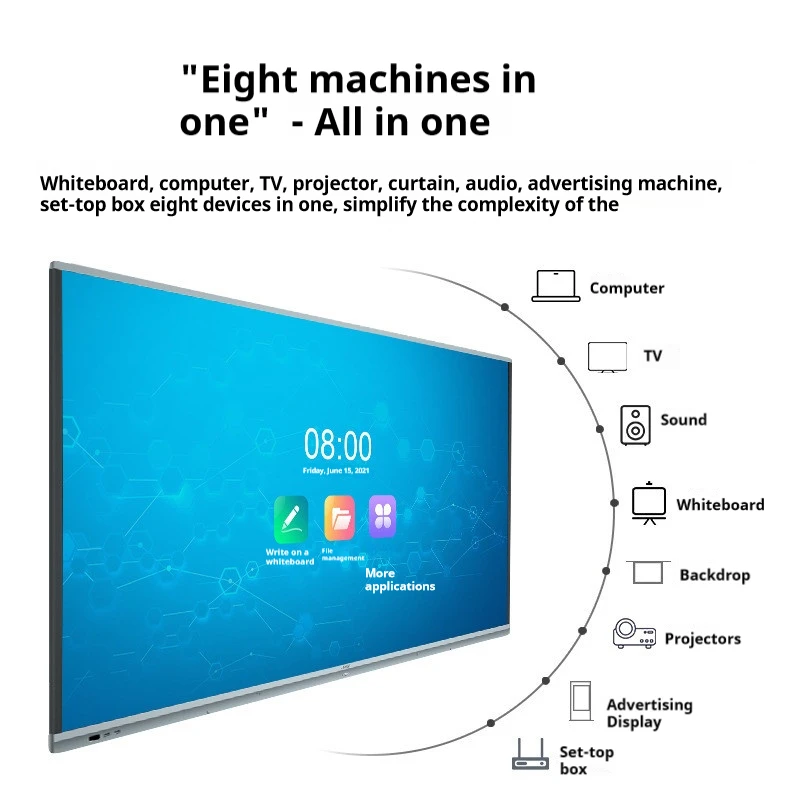
1.1. อะไรคือ Smart Board?
Smart Boards 2. เป็นอุปกรณ์สำหรับสัมผัสที่ขับเคลื่อนโดยเทคโนโลยีดิจิทัล ที่รวมถึงฟังก์ชันของกระดานขาวแบบดั้งเดิมกับดิจิทัล เหล่านี้มีการใช้งานกว้างขวางในสถานดูแลการศึกษาและสถานการณ์ธุรกิจ เนื่องด้วยความสามารถของเขาที่จะเพิ่มความสนใจในการแสดงผล ปรับปรุงความเข้าใจร่วมกัน และสนใจผู้ใช้ในทันที
3. วิธีที่ Smart Board ทำงาน
4. Smart Board ทำงานผ่านส่วนที่สามารถสัมผัสได้ 5. ที่สามารถตรวจจับการใส่ข้อมูลจากนิ้วหรือสไตลัส 6. พวกนั้นเชื่อมต่อกับคอมพิวเตอร์และอนุญาตให้ผู้ใช้ควบคุมซอฟต์แวร์ เขียน วาด และสื่อสารกับสาระตรงบนหน้าจอ โดยการรวมถึงซอฟต์แวร์หลายระบบ ทำให้การแชร์และบันทึกบันทึกดิจิทัลเป็นไปได้โดยไม่ชะตาม
7. ประเภทของ Smart Board
- 8. Interactive Whiteboards: 9. ใช้โปรเจคเตอร์ในการแสดงสาระบนส่วนที่สามารถสัมผัสได้ เหมาะสำหรับห้องเรียน
- 10. Touchscreen Smart Boards: 11. มีหน้าจอแสดงภาพแบบภายในเชิงลักษณ์ ด้วยการแสดงในระดับสูง ที่เหมาะสำหรับสถานการณ์วิชาชีพ
- 12. Projection-Based Smart Boards: 13. รวมโปรเจคเตอร์กับส่วนที่สามารถสัมผัสได้ เหมาะสำหรับสถานที่ใหญ่
14. ประโยชน์ของ Smart Board
- 15. การเรียนรู้ที่ดีขึ้น: 16. Smart Board รวมมัลติมีเดีย ทำให้บทเรียนมีความสนใจและสนใจสูงขึ้นสำหรับนักเรียน
- 17. การร่วมมือธุรกิจ: 18. ในสถานการณ์ธุรกิจ พวกมันทำให้การประชุมลดลงด้วยการร่วมมือระหว่างทันทีและการแชร์บันทึก
- 19. ความเข้าถึง: 20. ออ
Future Trends
The future of Smart Boards includes AI integration, improved IoT capabilities, and advancements in display technology, making them even more powerful and versatile.
In summary, Smart Boards are transforming how we learn and work by offering dynamic, interactive experiences that bridge the gap between traditional methods and digital innovation.
1. 2. กี่เงินต่อตารางสมาธิปทาน?
2. เมื่ออยู่ในภาพรวมที่จะลงทุน แผงจับเรียกคำถามสมาร์ท3. , การเข้าใจค่าใช้จ่ายที่เกี่ยวข้องเป็นสิ่งสำคัญ. ราคาของตารางสมาธิปทานจะแตกต่างกันอย่างมากเพื่อตามปัจจัยเช่นขนาดที่เล็กหรือใหญ่, คุณสมบัติ, แบรนด์ และอุปกรณ์เสริม
4. รุ่นตารางสมาธิปทานขั้นพื้นฐาน
5. ราคาของตารางสมาธิปทานขั้นต้นทั่วไปประมาณระหว่าง 1,000 และ 2,000 บาท 6. . รุ่นนี้มักจะเล็กกว่า ประมาณ 55 ถึง 65 นิ้ว และมีคุณสมบัติมาตรฐานเช่นการสัมผัสแบบต่อเนื่องและซอฟท์แวร์พาเลตเบื้องต้น นั้นเหมาะสำหรับห้องเรียนหรือห้องประชุมที่เล็กกว่า หรือที่ไม่จำเป็นต้องใช้คุณสมบัติที่ล้ำละกับ7. .
8. ตารางสมาธิปทานระดับกลาง
9. สำหรับผู้ที่ต้องการคุณสมบัติที่ล้ำละกว่า 10. ตารางสมาธิปทานระดับกลาง 11. อยู่ในราคา 2,000 ถึง 4,000 บาท 12. . ตารางนี้มักมีหน้าจอใหญ่กว่า (จนถึง 75 นิ้ว) ความสามารถมากมายในการสัมผัสแบบหลายจุด และตัวแทนซอฟท์ที่ดีขึ้น ที่เหมาะสำหรับคุณภาพรูปภาพที่ดีขึ้น และเหมาะสำหรับห้องเรียนใหญ่ ห้องประชุมของบริษัท และการนำเสนอที่มีความเคลื่อนไหวมาก 13. .
14. ตารางสมาธิปทานระดับสูง
15. ตารางสมาธิปทานระดับสูงที่มีราคา 5,000 บาทหรือมากกว่า 16. , จะมีคุณสมบัติระดับสูงและออกแบบสำหรับสภาพแวดล้อมการทำงานที่ต้องการการเล่นตัวที่ดีที่สุด รุ่นนี้มักมีหน้าจ, offer premium features and are designed for professional environments where top-tier performance is essential. These models typically include ultra-high-definition displays, advanced multi-touch capabilities, integrated cameras, and robust software suites. Sizes can exceed 80 inches, making them ideal for large conference rooms or auditoriums.
Additional Costs to Consider
Beyond the initial purchase price, several additional costs may arise when investing in a Smart Board:
- Software Licenses: Some Smart Boards require ongoing software subscriptions, which can add several hundred dollars annually.
- Installation: Professional installation services can cost anywhere from $200 to $500, depending on the complexity.
- Maintenance and Support: Extended warranties and technical support packages may also add to the overall cost.
Cost-Effective Alternatives
For those on a tighter budget, refurbished Smart Boards or older models may offer a more affordable option. Additionally, interactive projectors can serve as a cost-effective alternative to Smart Boards, providing similar functionality at a lower price point.
Is a Smart Board Worth the Investment?
1. ค่าของ Smart Board นั้นมากกว่าแค่หน้าตะกร้าราคาของมัน เมื่อพิจารณาสำหรับสถานศึกษา ความสามารถในการสร้างบทเรียนที่มีปฏิกรณ์และกระตุ้นประสบการณ์การเรียนการสอนของนักเรียน จะสามารถเพิ่มประสบการณ์การเรียนการสอนได้มากขึ้นมาก ในสถานการณ์ธุรกิจ การปรับปรุงการร่วมมือและผลิตภาพที่ดีขึ้นของมันสามารถแปลงงานให้มีค่าต่อการลงทุน ในขณะที่กำลังพิจารณาค่าใช้จ่าย มันสำคัญที่จะประเมินผลประโยชน์นี้กับค่าใช้จ่ายทางการเงิน
สรุป
2. ค่าของ Smart Board สามารถอยู่ในขอบเขตจาก 3. $1,000 ถึงเกิน $5,0004. ขึ้นกับรุ่นและคุณสมบัติของมัน ในขณะที่การลงทุนในช่วงตอนแรกอาจดูว่าเป็นสิ่งที่มีค่ามาก แต่ผลประโยชน์ทางยาวระยะในด้านการเพิ่มประสบการณ์การเรียนการสอน การปรับปรุงการร่วมมือ และการเพิ่มผลิตภาพที่ดีขึ้นทำให้มันเป็นทางเลือกที่มีค่าสำหรับสถานการณ์การเรียนการสอนและธุรกิจหลายๆองค์กร
5. 3. อะไรคือ Smart Board แบบสแวมมอร์ ไวท์เบอร์ด?
6. A 7. Smart Board แบบสแวมมอร์ ไวท์เบอร์ด 8. คือเครื่องมือเทคโนโลยีสูงสุดที่รวมความสามารถของไวท์เบอร์ดแบบปกติกับพลังของคอมพิวเตอร์ เป็นปฏิกรณ์ที่มีประสบการณ์สนุกสนานสำหรับผู้ใช้ ที่ใช้กันเป็นวิกฤติในสถานการณ์การเรียนการสอนและธุรกิจ โดยมันกำลังแปลงแนวทางที่เราสอน เรียน และร่วมมือ
9. หลังจากนี้ Smart Board ทำงานได้อย่างไร?
10. Smart Board แบบสแวมมอร์ ไวท์เบอร์ดทำงานผ่าน 5. ที่สามารถตรวจจับการใส่ข้อมูลจากนิ้วหรือสไตลัส 11. ที่ตอบสนองต่อการบุลค
Key Features of Smart Board Interactive Whiteboards
- Touch Interactivity: The core feature of a Smart Board is its touch-sensitive surface, which supports both single and multi-touch gestures. This allows multiple users to interact with the board simultaneously, making it ideal for collaborative activities.
- Digital Ink: Users can write on the board using a stylus or their finger, and the digital ink can be saved and shared electronically. This feature is particularly useful for educators who want to capture and distribute lesson notes.
- Integrated Software: Smart Boards come with specialized software designed to enhance their functionality. This software includes tools for creating interactive lessons, annotating presentations, and accessing a wide range of multimedia content.
- Connectivity Options: Smart Boards can connect to various devices, such as computers, tablets, and smartphones, via HDMI, USB, or wireless connections. This versatility allows for seamless integration with existing technology infrastructures.
Benefits of Using a Smart Board Interactive Whiteboard
- Enhanced Learning Experience: In classrooms, Smart Boards make lessons more engaging by integrating multimedia elements such as videos, images, and interactive simulations. This approach caters to different learning styles and helps students grasp complex concepts more easily.
- Improved Collaboration: In corporate settings, Smart Boards facilitate real-time collaboration by allowing team members to work together on documents, presentations, and brainstorming sessions. The ability to save and share notes instantly streamlines communication and boosts productivity.
- 19. ความเข้าถึง: Smart Boards are designed with accessibility features that accommodate users with disabilities. This ensures that everyone, regardless of physical ability, can benefit from the technology.
Applications of Smart Board Interactive Whiteboards
- การศึกษา: Smart Boards are widely used in classrooms to create interactive and dynamic learning environments. Teachers can develop engaging lessons that encourage student participation and foster a deeper understanding of the material.
- Business: In the corporate world, Smart Boards are used for presentations, training sessions, and collaborative projects. Their ability to integrate with various software platforms makes them a versatile tool for improving communication and decision-making processes.
สรุป
6. A 7. Smart Board แบบสแวมมอร์ ไวท์เบอร์ด 1. คือเครื่องมือที่มีพลังสูงที่รวมเครื่องมือทางดิจิทัลและทางด้านปัจจุบันด้วยกัน ด้วยการเสนอการสัมผัสที่เป็นประสิทธิภาพ ดิจิทัลอินค์ และการสัมผัสซอฟท์แวร์ที่แข็งแกร่ง Smart Boards ช่วยเพิ่มการเรียนรู้และการประชุมร่วมมือในหลายๆสาขา ไม่ว่าจะอยู่ในห้องเรียนหรือห้องประชุม ตัว Smart Board จะเปลี่ยนแปลงวิธีที่เราสัมผัสกับข้อมูล ทำให้มันเป็นทรัพย์สินที่มีค่ามากในยุคดิจิทัลปัจจุบัน
2. 4. ยังเป็นไหมที่จะใช้ Smart Board?
3. การใช้ แผงจับเรียกคำถามสมาร์ท 4. สามารถเพิ่มประสิทธิภาพให้กับการนำเสนอ การเรียนการสอน และการประชุมร่วมมือด้วยการเสนอความสัมผัสที่เกินกว่าบอร์ดเขียนทางแบบปัจจุบัน ไม่ว่าจะอยู่ในห้องเรียนหรือสถานการณ์บริษัท การเรียนรู้ที่จะใช้ Smart Board ได้ผลมากขึ้นและเพิ่มประสิทธิภาพในงานของคุณ คู่มือนี้จะนำคุณผ่านขั้นตอนพื้นฐานเพื่อเริ่มต้น
5. 1. การตั้งค่า Smart Board
6. ก่อนที่จะเริ่มใช้ Smart Board ต้องให้ทุกส่วนที่จำเป็นถูกเชื่อมต่อที่ถูกต้อง:
- 7. เชื่อมต่อ Smart Board กับคอมพิวเตอร์: 8. ส่วนใหญ่ของ Smart Board ต้องการการเชื่อมต่อกับคอมพิวเตอร์ ใช้สายที่เหมาะสม (USB, HDMI หรือไร้สาย) เพื่อเชื่อมต่อ Smart Board กับอุปกรณ์ของคุณ
- 9. เปิดโปรเจคเตอร์หรือหน้าจอแสดง: 10. ถ้า Smart Board ของคุณใช้โปรเจคเตอร์นอกตัว จะต้องเปิดโปรเจคเตอร์และให้ความเชื่อมโยงให้หน้าจอคอมพิวเตอร์ถูกแสดงบนบอร์ด สำหรับโมเดลที่มีหน้าจอแสดงเปิดดังกล่าว จะต้องเปิดบอร์ดโดยตรง
- Calibrate the Board (if necessary): Calibration ensures that the touch inputs on the board align correctly with the projected image. Follow the on-screen instructions to complete the calibration process.
2. Navigating the Interface
Once your Smart Board is set up, you can start interacting with it:
- Touch Control: Use your finger or a stylus to navigate the board. You can open applications, browse the internet, or interact with digital content by touching the screen.
- Digital Ink: Select the pen tool to write or draw on the board. Digital ink allows you to annotate presentations, highlight key points, or make notes directly on the displayed content.
- Eraser Tool: To erase mistakes or unwanted marks, use the eraser tool by selecting it from the toolbar or by using the back of the stylus (if equipped).
3. Using Smart Board Software
Most Smart Boards come with integrated software that enhances their functionality:
- Open the Software: Launch the Smart Board software, which may include tools like Smart Notebook, for creating interactive lessons or presentations.
- Create Interactive Content: Use the software to add images, videos, and interactive elements to your presentations. You can save and share these files for later use.
- Save and Share Notes: After a session, save your notes directly to your computer or cloud storage. This allows you to review or distribute the content to others.
4. Incorporating Multimedia
One of the strengths of a Smart Board is its ability to integrate multimedia:
- Play Videos: ใส่หรือสตรีมวิดีโอตรงบนกระดานเพื่อเพิ่มความสนใจในการนำเสนอของคุณ ใช้ส่วนประกอบที่สามารถสัมผัสเพื่อหยุด, เริ่ม, หรือเลื่อนตัววิดีโอ
- แสดงภาพและโครงนวน: ใส่ภาพ โครงนวน หรือกราฟง่ายๆ เพื่อสนับสนุนเนื้อหาของคุณ ทำให้การนำเสนอของคุณมีความสนใจทางด้านทัศน์มากขึ้น
5. ร่วมงานกับผู้อื่น
กระดานสมาชิกอิเล็กทรอนิกส์เป็นที่สมานสมายงามสำหรับงานร่วมมือ:
- การสัมผัสที่มีหลายๆ ตัว ส่วนใหญ่ของกระดานสมาชิกอิเล็กทรอนิกส์สนับสนุนการสัมผัสที่มีหลายๆ ตัว ทำให้ผู้ใช้หลายๆ คนสามารถสัมผัสกับกระดานได้พร้อมกัน คุณสมบัตินี้มีประโยชน์มากเป็นอย่างยิ่งสำหรับกิจกรรมกลุ่มและระยะเวลาสนทนา
- การแก้ไขทันที ทำงานบนเอกสาร สเปรดชีต หรือการนำเสนอในทันที ทั้งหมดการเปลี่ยนแปลงจะถูกแสดงทันทีบนกระดาน
สรุป
3. การใช้ แผงจับเรียกคำถามสมาร์ท การที่เข้าใจและใช้งานเอกสารยังเป็นส่วนหนึ่งของการสัมผัสหน้าจอมากกว่า มันเกี่ยวกับการใช้เทคโนโลยีเพื่อสร้างการนำเสนอหรือบทเรียนที่มีปฏิสนันธ์ ฝึกฝนการตั้งค่า การเลื่อนตัว ซอฟต์แวร์ การรวมเข้ากันของมีเดีย และคุณสมบัติการร่วมงาน เพื่อใช้ความเป็นไปได้ของกระดานสมาชิกอิเล็กทรอนิกส์ได้ทั้งหมดในสภาพแวดล้อมที่แตกต่างกัน