
1.$1,000 and $2,000
לוחות תקש Mid-Range Smart Boards
For those seeking more advanced functionality,
mid-range Smart Boards are available in the $2,000 to $4,000
price range. These boards often feature larger screens (up to 75 inches), multi-touch capabilities, and enhanced software options. They offer better image quality and are well-suited for larger classrooms, corporate settings, and more dynamic presentations.
- High-End Smart Boards High-end Smart Boards, which can cost
- $5,000 or more , offer premium features and are designed for professional environments where top-tier performance is essential. These models typically include ultra-high-definition displays, advanced multi-touch capabilities, integrated cameras, and robust software suites. Sizes can exceed 80 inches, making them ideal for large conference rooms or auditoriums.
- Additional Costs to Consider Beyond the initial purchase price, several additional costs may arise when investing in a Smart Board:
Software Licenses:
- Some Smart Boards require ongoing software subscriptions, which can add several hundred dollars annually. Installation:
- Professional installation services can cost anywhere from $200 to $500
- , depending on the complexity. Maintenance and Support:
Extended warranties and technical support packages may also add to the overall cost.
Cost-Effective Alternatives For those on a tighter budget, refurbished Smart Boards or older models may offer a more affordable option. Additionally, interactive projectors can serve as a cost-effective alternative to Smart Boards, providing similar functionality at a lower price point.Is a Smart Board Worth the Investment? The value of a Smart Board extends beyond its price tag. For educational institutions, the ability to create interactive and engaging lessons can significantly enhance the learning experience. In corporate settings, the improved collaboration and productivity can justify the investment. When considering the cost, it’s essential to weigh these benefits against the financial outlay.The cost of a Smart Board can range from $1,000 to over $5,000, depending on the model and features. While the initial investment may seem substantial, the long-term benefits in terms of enhanced learning, improved collaboration, and increased productivity make it a worthwhile consideration for many educational and business environments.
3.What is a smart board interactive whiteboard לוחות תקש Smart Board interactive whiteboard
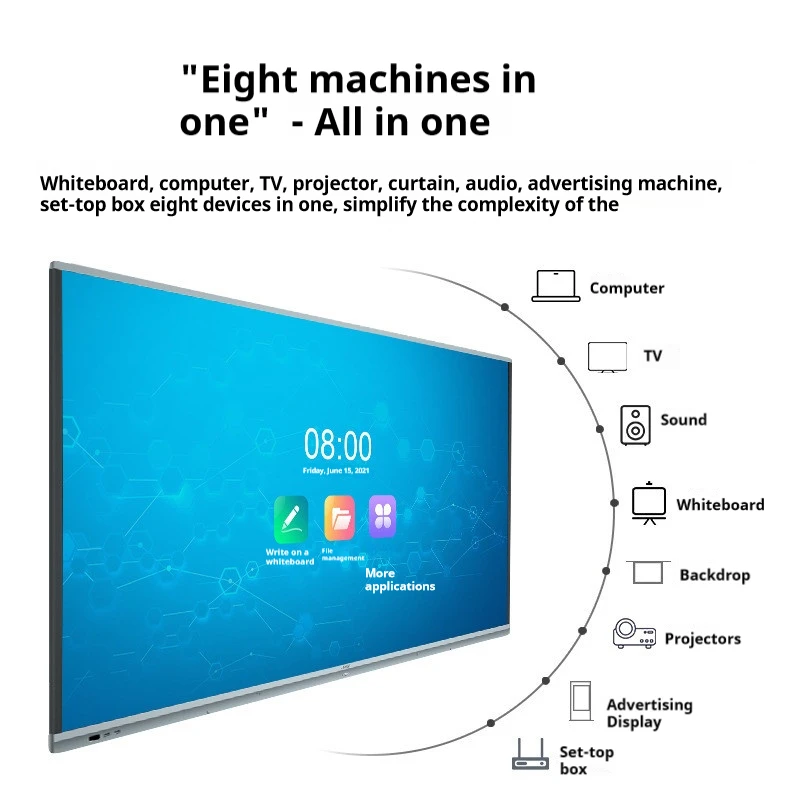
is a cutting-edge technology tool that combines the functionality of a traditional whiteboard with the power of a computer, creating an interactive and engaging experience for users. Widely used in educational and corporate environments, Smart Boards are transforming how we teach, learn, and collaborate.
How Does a Smart Board Work? לוח חכםthat responds to input from fingers, styluses, or other tools. It is typically connected to a computer and a projector or has a built-in display. The computer’s desktop is projected onto the Smart Board’s surface, allowing users to control applications, write notes, draw diagrams, and interact with content directly on the board.
Key Features of Smart Board Interactive Whiteboards
Touch Interactivity: The core feature of a Smart Board is its touch-sensitive surface, which supports both single and multi-touch gestures. This allows multiple users to interact with the board simultaneously, making it ideal for collaborative activities.Digital Ink:
Users can write on the board using a stylus or their finger, and the digital ink can be saved and shared electronically. This feature is particularly useful for educators who want to capture and distribute lesson notes.
Integrated Software: Smart Boards come with specialized software designed to enhance their functionality. This software includes tools for creating interactive lessons, annotating presentations, and accessing a wide range of multimedia content. Connectivity Options: Smart Boards can connect to various devices, such as computers, tablets, and smartphones, via HDMI, USB, or wireless connections. This versatility allows for seamless integration with existing technology infrastructures. Benefits of Using a Smart Board Interactive Whiteboard
Enhanced Learning Experience:
In classrooms, Smart Boards make lessons more engaging by integrating multimedia elements such as videos, images, and interactive simulations. This approach caters to different learning styles and helps students grasp complex concepts more easily. Improved Collaboration:In corporate settings, Smart Boards facilitate real-time collaboration by allowing team members to work together on documents, presentations, and brainstorming sessions. The ability to save and share notes instantly streamlines communication and boosts productivity.
Smart Boards are designed with accessibility features that accommodate users with disabilities. This ensures that everyone, regardless of physical ability, can benefit from the technology.
Applications of Smart Board Interactive Whiteboards
- Education: Smart Boards are widely used in classrooms to create interactive and dynamic learning environments. Teachers can develop engaging lessons that encourage student participation and foster a deeper understanding of the material.
- Business: In the corporate world, Smart Boards are used for presentations, training sessions, and collaborative projects. Their ability to integrate with various software platforms makes them a versatile tool for improving communication and decision-making processes. is a powerful tool that brings together the best of traditional and digital technologies. By offering touch interactivity, digital ink, and robust software integration, Smart Boards enhance learning and collaboration across various sectors. Whether in a classroom or a boardroom, a Smart Board transforms the way we interact with information, making it an invaluable asset in today’s digital age.4.How do i use a smart board?
- Using a can significantly enhance your presentations, lessons, and collaborative sessions by offering interactive features that go beyond traditional whiteboards. Whether you’re in a classroom or a corporate setting, learning how to use a Smart Board effectively can make your work more engaging and efficient. This guide will walk you through the essential steps to get started.
1. Setting Up the Smart Board
Before you begin using the Smart Board, ensure that all necessary components are correctly connected:
Connect the Smart Board to a Computer:
Most Smart Boards require a connection to a computer. Use the appropriate cables (USB, HDMI, or wireless) to link the Smart Board to your device.
מסקנה
If your Smart Board uses an external projector, turn it on and ensure that the computer’s screen is projected onto the board. For models with built-in displays, power on the board directly. Calibrate the Board (if necessary):Calibration ensures that the touch inputs on the board align correctly with the projected image. Follow the on-screen instructions to complete the calibration process.
2. Navigating the Interface?
Once your Smart Board is set up, you can start interacting with it: Touch Control: Use your finger or a stylus to navigate the board. You can open applications, browse the internet, or interact with digital content by touching the screen.
Select the pen tool to write or draw on the board. Digital ink allows you to annotate presentations, highlight key points, or make notes directly on the displayed content.
Eraser Tool: are available in the 3. Using Smart Board Software
Most Smart Boards come with integrated software that enhances their functionality:
- Open the Software: Launch the Smart Board software, which may include tools like Smart Notebook, for creating interactive lessons or presentations.
- Create Interactive Content: Use the software to add images, videos, and interactive elements to your presentations. You can save and share these files for later use.
- Save and Share Notes: After a session, save your notes directly to your computer or cloud storage. This allows you to review or distribute the content to others.
- 4. Incorporating Multimedia One of the strengths of a Smart Board is its ability to integrate multimedia:
Play Videos:
- Embed or stream videos directly onto the board to enhance your presentation. Use the touch interface to pause, play, or navigate through the video. Display Images and Diagrams:
- Easily insert images, diagrams, or charts to support your content, making your presentations more visually engaging. 5. Collaborating with Others
- , depending on the complexity. Multi-Touch Interaction:
Most Smart Boards support multi-touch, allowing multiple users to interact with the board simultaneously. This feature is particularly useful for group activities and brainstorming sessions.
- Real-Time Editing: Work on documents, spreadsheets, or presentations in real-time, with all changes displayed instantly on the board.
- effectively involves more than just touching the screen—it’s about leveraging the technology to create interactive, engaging, and efficient presentations or lessons. By mastering the setup, navigation, software, multimedia integration, and collaboration features, you can fully utilize the potential of a Smart Board in any environment. Choosing the Right Display: OLED, LED, or LCD?
מסקנה
Once your Smart Board is set up, you can start interacting with it: Touch Control: 1. זהו כלי חזק שמאחד את הטוב ביותר מהטכנולוגיות המסורתיות והדיגיטליות. על-ידי כך שהוא מציע אינטראקטיביות נגיע, צבעוני דיגיטלי, ואינטגרציה תוכנתית חזקה, לוחות חכמים משפרים את הלמידה והשיתוף-פעולה במגוון תחומים. בין אם בכיתה או בישיבת מנהלים, לוח חכם משנה את הדרך בה אנחנו מתקשרים עם מידע, עשוי להיות נכס בלתי-נדלה בעידן הדיגיטלי של היום.
2. 4. איך אני משתמש/ת בלוח חכם?
3. שימוש ב לוח חכם 4. יכול לשפר במידה משמעותית את ההצגות, השיעורים, ופעולות השיתוף-פעולה שלך על-ידי מתן תכונות אינטראקטיביות שהולכות מעבר ללוחות לבנים מסורתיים. בין אם אתה/אתה בכיתה או בסביבה עסקית, ללמוד איך להשתמש בלוח חכם בצורה יעילה יכול להפוך את העבודה שלך ליותר מעוררת עניין ויעילה. המדריך הזה ידריך אותך דרך השלבים המובטחים כדי להתחיל.
5. 1. הכנת הלוח החכם
6. לפני שתתחיל/ת להשתמש בלוח חכם, תוודא/י שכל המרכיבים הנחוצים מחוברים בצורה נכונה:
- 7. חבר/י את הלוח החכם למחשב: 8. רוב הלוחות החכמים דורשים חיבור למחשב. השתמש/י בחוטים המתאימים (USB, HDMI, או אלחוטי) כדי לחבר את הלוח החכם להתקן שלך.
- 9. פעיל/י את המקרן או התצוגה: 10. אם הלוח החכם שלך משתמש במקרן חיצוני, פעיל/י אותו ותוודא/י שהמסך של המחשב מוקר
- Calibrate the Board (if necessary): Calibration ensures that the touch inputs on the board align correctly with the projected image. Follow the on-screen instructions to complete the calibration process.
2. Navigating the Interface
Once your Smart Board is set up, you can start interacting with it:
- Touch Control: Use your finger or a stylus to navigate the board. You can open applications, browse the internet, or interact with digital content by touching the screen.
- Create Interactive Content: Select the pen tool to write or draw on the board. Digital ink allows you to annotate presentations, highlight key points, or make notes directly on the displayed content.
- Eraser Tool: To erase mistakes or unwanted marks, use the eraser tool by selecting it from the toolbar or by using the back of the stylus (if equipped).
3. Using Smart Board Software
Most Smart Boards come with integrated software that enhances their functionality:
- Open the Software: Launch the Smart Board software, which may include tools like Smart Notebook, for creating interactive lessons or presentations.
- Create Interactive Content: Use the software to add images, videos, and interactive elements to your presentations. You can save and share these files for later use.
- Save and Share Notes: After a session, save your notes directly to your computer or cloud storage. This allows you to review or distribute the content to others.
4. Incorporating Multimedia
One of the strengths of a Smart Board is its ability to integrate multimedia:
- Play Videos: לשים או לנגן וידאו ישירות על הלוח כדי לשפר את המצגת. השתמש בממשק המגע כדי להפסיק, להשיק, או לנווט דרך הוידאו.
- תצוגת תמונות ודיאגרמות: שימוש קל בתמונות, דיאגרמות, או גרפים כדי לתמוך בתוכן, כדי להפוך את המצגות שלך ליותר חזותיות.
5. שיתוף פעולה עם אחרים
לוחות חכמים מתאימים לעבודה משותפת:
- אינטראקציה רב-מגע: רוב הלוחות החכמים תומכים במגע רב-מגע, מאפשרים למספר משתמשים להתעסק עם הלוח בו-זמנית. התכונה הזו שימושית במיוחד לפעילויות קבוצתיות וסשנים של גירוי דעות.
- עריכה בזמן אמת: עבודה על מסמכים, גליונות שטח, או מצגות בזמן אמת, כשכל שינוי נראה מיד על הלוח.
מסקנה
3. שימוש ב לוח חכם להיות יעיל יותר מסתם לגעת במסך - זה עוסק בניצול הטכנולוגיה כדי ליצור מצגות או שיעורים אינטראקטיביים, מעוררי עניין ויעילים. על ידי השגת המומחיות בקביעת ההגדרות, נווט, תוכנה, אינטגרציה של מדיה, ותכונות שיתוף פעולה, אתה יכול להשתמש במלוא הפוטנציאל של לוח חכם בכל סביבה.